
Quick start
The following example creates a React message feed. It opens on the exact first unread message and loads older or newer messages as needed.
Install
npm install --save @infini-scroll/core @infini-scroll/reactpnpm add --save @infini-scroll/core @infini-scroll/reactyarn add --save @infini-scroll/core @infini-scroll/reactInfini depends on WebAssembly. Initialize it once before rendering a controller. Your bundler should be able to handle it:
import { initializeInfini } from "@infini-scroll/core";
import { createRoot } from "react-dom/client";
import { App } from "./App";

async function main() {
  await initializeInfini();
  createRoot(document.getElementById("root")!).render(<App />);
}

main();
Walkthrough
Item
Each item needs an unique, immutable ID. It is how Infini recognizes the same logical record across overlapping requests.
Items CAN NOT be reordered. Use a new ID for that purpose.
type Message = {
  id: string;
  createdAt: string;
  author: string;
  body: string;
  replyTo?: {
    id: string;
    author: string;
    body: string;
  };
};
Backend
For this example, we would use a simple in-memory backend.
Messages are ordered by timestamp, and that timestamp is also a stable cursor. The timestamp remains meaningful even if the message at that position is later deleted.
class MyBackend {
  constructor(private readonly messages: readonly Message[]) {}

  around(
    timestamp: string | null,
    pageSizeHint: number, // Page size is a hint; you can return more or less than that.
    signal: AbortSignal,
  ) {
    signal.throwIfAborted();

    if (timestamp === null) {
      return this.page(Math.max(0, this.messages.length - pageSizeHint));
    }

    const middle = this.lowerBound(timestamp);
    const start = Math.min(
      Math.max(0, middle - Math.floor(pageSizeHint / 2)),
      Math.max(0, this.messages.length - pageSizeHint),
    );
    return this.page(start, pageSizeHint);
  }

  fromEdge(
    timestamp: string,
    direction: "before" | "after",
    pageSizeHint: number,
    signal: AbortSignal,
  ) {
    signal.throwIfAborted();

    // Include the edge item. Infini deduplicates it by ID, and the overlap
    // proves that this page is continuous with the known items.
    if (direction === "before") {
      const end = this.upperBound(timestamp);
      return this.page(Math.max(0, end - pageSizeHint), pageSizeHint);
    }

    return this.page(this.lowerBound(timestamp), pageSizeHint);
  }

  locateRelative(timestamp: string, offset: number, signal: AbortSignal) {
    signal.throwIfAborted();
    const index = Math.max(
      0,
      Math.min(
        this.messages.length - 1,
        this.lowerBound(timestamp) + offset,
      ),
    );
    const message = this.messages[index];
    return { cursor: message.createdAt, targetId: message.id };
  }

  private page(start: number, pageSize = this.messages.length) {
    // Pages use the half-open range [start, end).
    const end = Math.min(this.messages.length, start + pageSize);
    return {
      items: this.messages.slice(start, end),
      // Exhausted tells Infini to stop requesting on this direction.
      exhaustedBefore: start === 0,
      exhaustedAfter: end === this.messages.length,
    };
  }

  private lowerBound(timestamp: string) {
    // Find the first message at or after the timestamp.
    // Still works even the corresponding message is gone.
    let low = 0;
    let high = this.messages.length;
    while (low < high) {
      const middle = (low + high) >>> 1;
      if (this.messages[middle].createdAt < timestamp) low = middle + 1;
      else high = middle;
    }
    return low;
  }

  private upperBound(timestamp: string) {
    let low = 0;
    let high = this.messages.length;
    while (low < high) {
      const middle = (low + high) >>> 1;
      if (this.messages[middle].createdAt <= timestamp) low = middle + 1;
      else high = middle;
    }
    return low;
  }
}

const authors = ["Ada", "Lin"];
const conversations = [
  "Anyone still awake?",
  "Unfortunately yes. My code decided sleep was optional.",
  "Same. I fixed one bug and created three new ones. Productivity 📈",
  "The classic software engineering experience.",
  "My favorite part is when the error says undefined and gives absolutely no emotional support.",
  "Great. We spent two hours improving everything except the thing we needed.",
];

const messages: Message[] = [];
for (let index = 0; index < 200; index += 1) {
  const replyDistance = 1 + ((index * 7) % Math.min(index || 1, 16));
  const repliedMessage =
    index > 4 && (index * 17) % 11 < 3
      ? messages[index - replyDistance]
      : undefined;
  messages.push({
    id: String(index + 1),
    createdAt: new Date(Date.UTC(2026, 0, 1, 9, index)).toISOString(),
    author: authors[index % authors.length],
    body: conversations[index % conversations.length],
    replyTo: repliedMessage && {
      id: repliedMessage.id,
      author: repliedMessage.author,
      body: repliedMessage.body,
    },
  });
}

const FIRST_UNREAD_ID = "121";
const LAST_MESSAGE_ID = messages.at(-1)!.id;
const backend = new MyBackend(messages);

function cursorForMessage(id: string) {
  return messages[Number(id) - 1].createdAt;
}

function locateMessage(items: readonly Message[], id: string) {
  return items.some((message) => message.id === id) ? id : null;
}
Provider
The Provider has two required operations:
bootstrapestablishes a continuous group of items near a starting positionfetchextends the known group before or after one of its edges
const messageProvider: Provider<Message, string, string> = {
  async bootstrap({ cursor, targetSize, signal }) {
    return backend.around(cursor, rowsFor(targetSize), signal);
  },

  async fetch({ cursor, direction, targetSize, signal }) {
    return backend.fromEdge(cursor, direction, rowsFor(targetSize), signal);
  },

  async locateOffset({ anchor, signedItemOffset, signal }) {
    return backend.locateRelative(
      anchor.createdAt,
      signedItemOffset,
      signal,
    );
  },
};

function rowsFor(targetSize: number) {
  return Math.ceil(targetSize / 104) + 4;
}
The public API calls the position value a cursor. It is an opaque bookmark understood by your data source; it is not required to be a database cursor or an item ID. The example uses createdAt, so the same timestamp can still describe a position if the item that originally supplied it is later deleted. The data model is discussed in Choosing a cursor.
Both Provider methods return:
type Page<T> = {
  items: readonly T[];
  exhaustedBefore: boolean;
  exhaustedAfter: boolean;
};
Items must be continuous and returned in normal content order. The boundary flags state whether a real start or end has been reached.
Render the feed
function MessageFeed({
  scrollHost,
  report,
}: {
  scrollHost: HTMLElement;
  report(message: string): void;
}) {
  const { controller, snapshot } = useInfini<
    Message,
    string,
    string,
    string
  >({
    provider: messageProvider,
    ops: {
      getId: (message) => message.id,
      getCursor: (message) => message.createdAt,
    },
    estimateSize: messageSize,
    defaultItemEstimate: 104,
    initial: {
      cursor: cursorForMessage(FIRST_UNREAD_ID),
      target: FIRST_UNREAD_ID,
      alignment: "start",
    },
    targetToCursor: cursorForMessage,
    locateTarget: locateMessage,
    residentBefore: 30,
    residentAfter: 30,
  });

  const scrollToMessage = React.useCallback(
    (id: string, alignment?: "end") => {
      controller.jump(id, { alignment });
    },
    [controller],
  );
  const scrollToBottom = React.useCallback(
    () => scrollToMessage(LAST_MESSAGE_ID, "end"),
    [scrollToMessage],
  );

  React.useEffect(() => {
    report(
      `${snapshot.phase.status} ${snapshot.layoutItems.length} mounted ${snapshot.mainLength} known`,
    );
  }, [report, snapshot]);

  let notice: React.ReactNode = null;
  if (
    snapshot.phase.status === "dormant" ||
    snapshot.phase.status === "bootstrapping"
  ) {
    notice = <p className="play-message">Loading messages…</p>;
  } else if (snapshot.phase.status === "failed") {
    notice = (
      <div className="play-message" role="alert">
        <p>{snapshot.phase.error.message}</p>
        <button onClick={controller.retry}>Try again</button>
      </div>
    );
  } else if (snapshot.phase.status === "ready" && snapshot.phase.empty) {
    notice = <p className="play-message">No messages yet.</p>;
  }

  return (
    <>
      {notice}
      <InfiniList
        controller={controller}
        scrollHost={scrollHost}
        rowClassName="message-shell"
        renderItem={(message) => (
          <MessageRow
            message={message}
            onReply={(id) => scrollToMessage(id)}
          />
        )}
      />
      <button
        type="button"
        className="go-to-bottom"
        onClick={scrollToBottom}
      >
        Go to bottom ↓
      </button>
    </>
  );
}

function MessageRow({
  message,
  onReply,
}: {
  message: Message;
  onReply(id: string): void;
}) {
  return (
    <>
      {message.id === FIRST_UNREAD_ID && (
        <div className="unread-divider" role="separator">
          Last unread message
        </div>
      )}
      <article className="message-row">
        {message.replyTo && (
          <blockquote>
            <button
              type="button"
              className="reply-link"
              onClick={() => onReply(message.replyTo!.id)}
            >
              #{message.replyTo.id} {message.replyTo.author}:{" "}
              {message.replyTo.body}
            </button>
          </blockquote>
        )}
        <header>
          <strong>{message.author}</strong>
          <span className="message-id">#{message.id}</span>
          <time dateTime={message.createdAt}>
            {new Date(message.createdAt).toLocaleTimeString([], {
              hour: "2-digit",
              minute: "2-digit",
            })}
          </time>
        </header>
        <p>{message.body}</p>
      </article>
    </>
  );
}.message-shell {
width: 100%; // You would also need a limited height!
padding: 5px 12px;
box-sizing: border-box;
}
.message-row {
padding: 10px 12px;
border: 1px solid CanvasText;
border-radius: 8px;
}
.message-row header {
display: flex;
gap: 8px;
}
.message-id {
opacity: 0.65;
font-family: monospace;
}
.message-row blockquote {
margin: 0 0 8px;
padding-left: 8px;
border-left: 2px solid currentColor;
}
.reply-link {
padding: 0;
border: 0;
background: transparent;
color: inherit;
text-align: left;
cursor: pointer;
}
.unread-divider {
margin-bottom: 8px;
color: LinkText;
text-align: center;
}
.go-to-bottom {
position: absolute;
z-index: 1;
right: 16px;
bottom: 16px;
}
.feed-notice {
position: absolute;
z-index: 1;
inset: 16px auto auto 16px;
}The initial target identifies the exact first unread row. cursor tells the Provider where to load, while locateTarget lets Infini align that row rather than merely the surrounding page. InfiniList stays mounted while the Provider bootstraps so its DOM host can apply that initial alignment. The button uses the same exact-target path to jump to the final message.
Try it
Behind the scene
The first Provider result forms a continuous known region —— the Main Island. Infini measures its rows and mounts only the pixel range needed around the viewport.
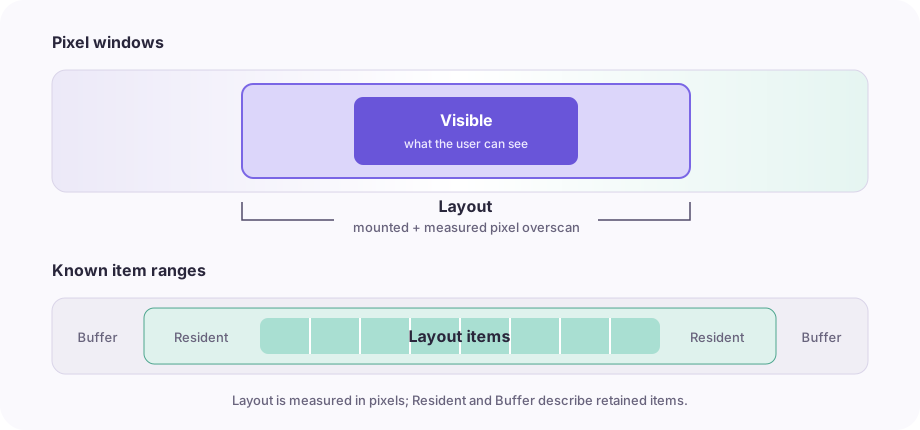
Visible and Layout
Visible is the unobscured physical viewport. Layout adds pixel overscan before and after it. Rows intersecting Layout are mounted and measured. More overscan can absorb faster scrolling, but mounts more DOM.
Resident and Buffer
Resident retains an item-count margin around Layout. It is useful for nearby data subscriptions. When a Provider returns more than Resident currently needs, those additional known items form Buffer and can be reused without another request.
Layout is measured in pixels because row heights vary. Resident is counted in items because subscriptions and memory budgets usually operate on records.
Islands and unknown content
An Island is a region whose ordering and adjacency are known. Infini can grow the Main Island by fetching from either edge. It does not assign permanent pixel positions to all unseen records.
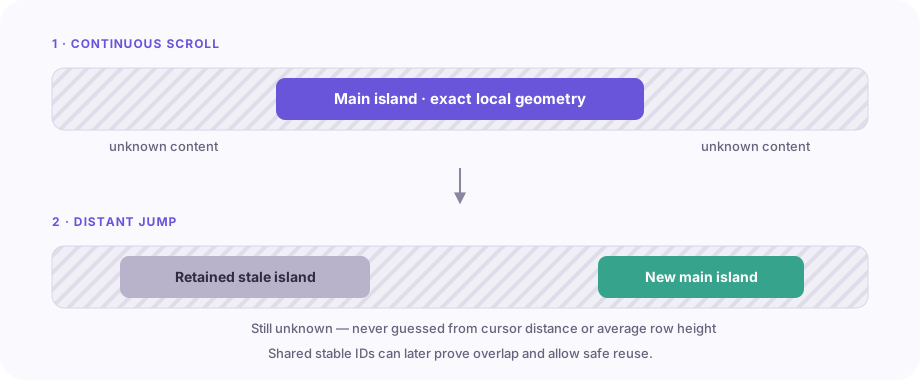
For nearby scrolling, this behaves like a continuous document. For a distant jump, Infini loads and hidden-measures a new region before showing it. Shared stable IDs can later prove that two regions overlap and may be joined safely.
Choosing a cursor
A cursor should describe where another request begins. It does not identify the item for rendering—that is the stable ID's job.
For an ascending message timeline, createdAt can be a cursor. MyBackend uses lowerBound and upperBound to find the insertion points immediately before or after a timestamp. A "before" request then takes a slice ending at that position:
const end = this.upperBound(timestamp);
const start = Math.max(0, end - pageSize);
const items = this.messages.slice(start, end);
This selects the messages at or before the timestamp and returns the slice in the timeline's normal order, which is the order Infini expects.
If the message at exactly timestamp was deleted, the timestamp still describes a valid location. This is one reason to keep stable identity and request position as separate concepts:
ops: {
  getId: (message) => message.id,
  getCursor: (message) => message.createdAt,
}
If multiple rows can share a timestamp, use a compound value such as { createdAt, id } and a matching database condition. Cursors may also be opaque server tokens. Infini stores and returns them without comparing them.
Returning appropriately sized pages
targetSize is requested pixel coverage, not a fixed item count. The Provider usually cannot know final DOM heights, so convert it with a reasonable estimate and include a small margin:
const pageSize = Math.ceil(targetSize / 104) + 4;Returning extra items is safe; they become Buffer. At a genuine content boundary, return fewer items and set the matching exhaustedBefore or exhaustedAfter flag.
An empty fetch must mark the requested side exhausted. Otherwise the same edge would remain open and immediately need another request.
Using an overflow container
Render the feed only after the container ref exists:
function FeedPanel() {
  const [scrollHost, setScrollHost] = useState<HTMLDivElement | null>(null);

  return (
    <div ref={setScrollHost} className="feed-viewport">
      {scrollHost ? <MessageFeed scrollHost={scrollHost} /> : null}
    </div>
  );
}.feed-viewport {
position: relative;
height: 70vh;
overflow: auto;
overscroll-behavior: contain;
}If a fixed toolbar covers part of the viewport, pass its size as paddingStart or paddingEnd. Do not use these props for ordinary in-flow padding.
Distant scrollbar travel
Ordinary edge fetching does not require random access. If the UI allows the user to drag far into unknown content, add the optional locateOffset operation:
async locateOffset({ anchor, signedItemOffset, signal }) {
  return backend.locateRelative(anchor.createdAt, signedItemOffset, signal);
}
Its result may be approximate. Infini follows it with a normal bootstrap and DOM measurement, so the destination becomes locally exact.
Next steps
- Read Provider contract before connecting production data.
- Use the React wrapper guide for lifecycle, alignment, and reading-position patterns.
- Use the Headless interface with Vue, Svelte, Solid, or custom DOM rendering.
- Modify and run a complete example in the Playground.